Stay informed about the latest features, improvements, and important updates for the Deepcura platform. This article contains a running log of recent changes.
-
- Ambient notes were step one. Meet Ambient Data: the patient chart that fills itself from what your AI staff already capture during ordinary work — visits, calls, messages, payments, and imports. From the Patients page, open any patient and click Open the full chart.
Every angle, nothing to maintain: one page with focused views for Overview, Identity & Coverage, Relationship, Ambient Data (clinical), Financial, Care Operations, an itemized AI Service Ledger, and a full patient Timeline of every visit, call, text, fax, payment, and consent.
Blueprint before, diff after: walk in with the patient's current problems, meds, allergies, and trends assembled for you; walk out reviewing only what today's visit changed — approve, edit, or reject each suggestion with its verbatim evidence one click away.
Ambient Trackables — say it once, tracked forever: standard vitals and scores out of the box, plus any metric your practice defines — captured from ordinary visit conversation into trend charts, every point badged by how it was verified.
Read the Ambient Data guide · Learn about Ambient Trackables.
- Ambient notes were step one. Meet Ambient Data: the patient chart that fills itself from what your AI staff already capture during ordinary work — visits, calls, messages, payments, and imports. From the Patients page, open any patient and click Open the full chart.
-
- Your visit now ends with a review, not a re-read. A new right-side panel on the chat page shows the live transcript while you record — and after you complete the session, the AI compares the visit against the patient's chart and suggests only what changed: new conditions, medication starts/stops/changes, allergies, spoken lab values and vitals, immunizations, procedures, family and social history.
You stay in control: every suggestion shows the verbatim quote behind it and waits for your Approve, Edit, or Reject — nothing touches the chart until you say so. Keyboard triage (↑↓ / A / E / R) makes review fast; a "Needs your hand" section lists anything the AI heard but couldn't safely file on its own.
Honest status: the panel always tells you whether the visit review ran, is running, was skipped, or failed — an empty queue never pretends to be a clean one.
Learn how the Visit Panel works.
- Your visit now ends with a review, not a re-read. A new right-side panel on the chat page shows the live transcript while you record — and after you complete the session, the AI compares the visit against the patient's chart and suggests only what changed: new conditions, medication starts/stops/changes, allergies, spoken lab values and vitals, immunizations, procedures, family and social history.
-
- Every AI-suggested fact now carries the exact words it came from. Click the evidence chip on any suggestion, imported record, or trend-chart point to see the verbatim quote — and open the source itself: visit audio that jumps to the exact second it was spoken, PDFs opened to the right page with the passage highlighted, call recordings, chat sessions, and message threads.
Verified means verified: if a quote can't be located word-for-word in its source, the suggestion is flagged so you know to review it with extra care.
Recordings kept: backup recordings are now saved by default (change anytime in Settings → Automations) so evidence links stay playable years later.
Learn more about Evidence on Demand.
- Every AI-suggested fact now carries the exact words it came from. Click the evidence chip on any suggestion, imported record, or trend-chart point to see the verbatim quote — and open the source itself: visit audio that jumps to the exact second it was spoken, PDFs opened to the right page with the passage highlighted, call recordings, chat sessions, and message threads.
-
- Your scribe now sees the whole patient, not just the visit audio: every note generation automatically includes the patient's demographics, insurance, and clinical profile. The upgraded Patient Panel on the chat page (folder icon, or Alt + Right Arrow) shows exactly what that is.
Memory tab: problems, medications, allergies, latest values with trend sparklines, and narrative summaries — each entry badged by how it was verified.
Visits & docs tab: pick previous encounters and documents to include as extra context for your next note.
Admin awareness: a collapsed "changes since last visit" strip lists administrative updates with before/after views — one click to see, never mixed into your clinical picture.
Learn how the Patient Panel works.
- Your scribe now sees the whole patient, not just the visit audio: every note generation automatically includes the patient's demographics, insurance, and clinical profile. The upgraded Patient Panel on the chat page (folder icon, or Alt + Right Arrow) shows exactly what that is.
-
- Bring your patient list into DeepCura in minutes. From the Patients page, upload a CSV, Excel, or PDF export from your previous system — the AI proposes the column mapping, you review what will be imported fact by fact, and the import runs in the background.
Safe by design: existing patients match by name + date of birth (no duplicates), clinical codes are verified against current official code releases before they're written (unverifiable codes import as plain text, never a guess), sensitive identifiers like MRN apply only when you explicitly approve them, and imported results land at their real clinical dates so trend charts show true history.
The AI mapping preview costs 3 credits per file, refunded automatically if it fails.
Read the bulk import guide.
- Bring your patient list into DeepCura in minutes. From the Patients page, upload a CSV, Excel, or PDF export from your previous system — the AI proposes the column mapping, you review what will be imported fact by fact, and the import runs in the background.
-
- Ask the in-app AI assistant a question about your whole panel — "Which of my diabetic patients have an A1c above 9?", "Who hasn't had an A1c in the last year?" — and get an interactive result card in the thread: a population chart, a row per matched patient with their latest value, trend sparkline, and verification badge, plus CSV export for outreach.
Three query types: threshold panels, care-gap recall lists (including never-measured patients), and tracking panels for any metric — standard or custom.
Traceable numbers: every value drills down to its evidence, and truncated results say so instead of posing as complete.
Learn how to run population queries.
- Ask the in-app AI assistant a question about your whole panel — "Which of my diabetic patients have an A1c above 9?", "Who hasn't had an A1c in the last year?" — and get an interactive result card in the thread: a population chart, a row per matched patient with their latest value, trend sparkline, and verification badge, plus CSV export for outreach.
-
- Tell the AI assistant what changed — "update her phone number," "add a penicillin allergy — rash, moderate," "mark the knee pain resolved" — and review a side-by-side Current → Proposed diff with a checkbox per row. Approve applies only what you checked; nothing is written without your click.
Codes you can trust: every proposed diagnosis, medication, allergy, or lab code is verified against current official code releases before it reaches your review — if no verified code matches exactly, the assistant offers the closest verified options instead of inventing one.
See how chart editing from chat works.
- Tell the AI assistant what changed — "update her phone number," "add a penicillin allergy — rash, moderate," "mark the knee pain resolved" — and review a side-by-side Current → Proposed diff with a checkbox per row. Approve applies only what you checked; nothing is written without your click.
-
- DeepCura now verifies every AI-proposed clinical code against current official releases of the standard vocabularies — ICD-10-CM, SNOMED CT®, LOINC®, RxNorm, and CPT® — before it can reach a patient's record. A code that doesn't verify is refused rather than written.
One-time acceptance screen: because some of these vocabularies are licensed, our Terms of Service were updated on July 15, 2026, and existing users see a short one-time acceptance walkthrough at sign-in. License reporting includes organization information only — never patient data — and our commitment that patient data is never sold is unchanged.
Read what the July 2026 Terms update covers.
- DeepCura now verifies every AI-proposed clinical code against current official releases of the standard vocabularies — ICD-10-CM, SNOMED CT®, LOINC®, RxNorm, and CPT® — before it can reach a patient's record. A code that doesn't verify is refused rather than written.
-
- Generating a document in the Automation Hub — Patient Instructions, a Referral Letter, or a Prior-Authorization Letter — now costs 0.5 credits per document, shown before you generate and refunded automatically if a generation fails. Referral and prior-auth letters also now draw on the patient's verified chart history (clinician-confirmed and imported facts, clearly attributed) alongside today's transcript, so outbound documents reflect the chart you've approved.
See the Automation Hub guide.
- Generating a document in the Automation Hub — Patient Instructions, a Referral Letter, or a Prior-Authorization Letter — now costs 0.5 credits per document, shown before you generate and refunded automatically if a generation fails. Referral and prior-auth letters also now draw on the patient's verified chart history (clinician-confirmed and imported facts, clearly attributed) alongside today's transcript, so outbound documents reflect the chart you've approved.
-
- Your Athena integration is now more secure when multiple providers share the same practice.
Practice Secret: Each Athena practice now has a unique secret that links your DeepCura account to your practice. The first provider to connect gets a secret generated automatically. Additional providers enter that same secret to join — ensuring only authorized team members can access your practice data.
Easy Sharing: Copy your Practice Secret directly from Settings and share it with colleagues. A rotate button lets you generate a new secret at any time if needed — it updates for everyone in the practice instantly.
View the updated Athena setup guide.
- Your Athena integration is now more secure when multiple providers share the same practice.
-
- Turn every AI call into a revenue opportunity with built-in payment collection powered by Stripe.
AI Receptionist Payments: Your AI receptionist can now send secure payment links via SMS or email invoices to patients during live phone calls — no staff intervention needed.
Stripe Connect Integration: Connect your Stripe account in Settings to start accepting payments. Each provider gets their own secure Stripe account with full onboarding, statement descriptor customization, and multi-currency support.
Complete Billing Dashboard: A dedicated AI Payments page with five tabs — Dashboard analytics with revenue charts, a Services & Fees schedule, Invoice management, Subscription billing for recurring services, and full Payment Logs with filtering and refund capabilities.
AI Charge Recommendations: After a visit, AI analyzes the clinical transcript and recommends appropriate charges from your fee schedule — saving time on billing decisions.
Subscriptions & Invoices: Create recurring billing plans, send professional invoices with due dates, and track everything from draft to paid — all from one place.
Real-Time Analytics: Track total revenue, payment counts, average amounts, revenue by source (AI Receptionist, Scribe, Invoice, etc.), top patients, and subscription cohort retention.
Learn more about AI Billing and how to get started.
- Turn every AI call into a revenue opportunity with built-in payment collection powered by Stripe.
-
- Your practice now has a voice-powered AI receptionist that handles real phone calls.
Voice-Guided Setup: Speak with the AI to configure your receptionist — no forms needed. It even fetches your practice website to pre-populate your knowledge base.
Real Phone Calls: Get a dedicated phone number by area code. The AI handles inbound and outbound calls with natural-sounding voice, speech recognition, and intelligent reasoning.
12 Call Template Categories: Reception, Scheduling, Triage, FAQ, Prescription Refill, Referral, Insurance Verification, Medical Records, After Hours, New Patient, Routing, and Custom.
Zendesk Integration: Connect your Zendesk Help Center in Settings and the AI receptionist will search your articles in real-time during live calls — callers get accurate answers from your existing knowledge base.
Built-in Intelligence: Post-call AI summaries, full call recording and transcripts, visual call flow builder, and an analytics dashboard to track performance.
Simple Pricing: 1 credit per setup session, 1 credit per inbound call, 1 credit per outbound call. No per-minute billing.
Read the complete AI Receptionist guide to learn more.
- Your practice now has a voice-powered AI receptionist that handles real phone calls.
-
- Meet our most powerful AI model yet.
Claude Opus 4.6 by Anthropic is now available in DeepCura, delivering richer, more accurate clinical documentation for complex visits.
-Expect better handling of multi-problem cases, long patient histories, and specialist workflows.
-Advanced PDF analysis for records, labs, and referrals.
Available across AI scribing, document chat, and PDF extraction directly from your dashboard.
Simply select Claude Opus 4.6 from the model selector when starting a session.
- Meet our most powerful AI model yet.
-
- Control your entire practice and team from a single intelligent interface.
Unified Practice Control: Manage tasks, communications, appointments, and patient workflows from one centralized experience.
Smart Communications: Automatically find nearby pharmacies based on a patient’s address, including verified fax numbers and fax order routing. Send emails or messages to patients directly using your connected Gmail account.(Requires Google's BAA)
Intelligent Task Awareness: Instantly see everything that’s due today, automatically organized by urgency and deadline. The Orchestrator keeps your day prioritized without manual tracking.
Context-Aware Patient Responses: Answer patient questions accurately by leveraging their existing message threads and clinical context—no searching required.
Dynamic Scheduling: Schedule new appointments or update existing ones effortlessly, whether for a single patient or across your entire calendar.
What’s Next: AI Calls are coming soon, enabling full voice-based communication and making the Orchestrator truly omnichannel. We’re also preparing the release of an AI Employee—our most advanced autonomous clinical assistant yet.
- Control your entire practice and team from a single intelligent interface.
-
- Your AI Analytics Reports just got a whole lot more shareable!
Download and share them as stunning, professional PDFs that include everything: Longitudinal Patient History Timeline, AI Clinical Decision Tree, Abnormal Delta Score Across Encounters, AI Pre-chart Longitudinal Summary, Drug Interaction Alerts, Specialty-Specific Contextual Question Suggestions, and Contextual Protocols.
Perfect for consultations, referrals, and comprehensive patient care coordination!
- Your AI Analytics Reports just got a whole lot more shareable!
-
- Evidence-based medicine just got faster!
Our new scientific chat box lets you ask clinical questions and get answers directly from your selected journals, all on the same page. No more navigating between screens.
Get beautifully organized responses with direct links to article publications, bringing the latest research to your fingertips in seconds!
- Evidence-based medicine just got faster!
-
- Template customization has never been this effortless!
Click the "graduation cap" icon right where you created your note to teach DeepCura your preferences. Specify any changes you'd like, and the AI will suggest edits and automatically update your template to match your clinical style.
It's the perfect combination of convenience and intelligence. Upgrade your templates without leaving your workflow!
- Template customization has never been this effortless!
-
- Make patient onboarding completely seamless!
Add a custom domain for your AI Nurse intake link and embed it directly into your website. New patients can complete their intake forms right where they schedule appointments.
A smooth and modern experience from start to finish!
- Make patient onboarding completely seamless!
-
-
The AI Nurse now fully automates patient consent collection, seamlessly combining legal consent forms with the clinical intake flow, all from a single secure link.
Consent is completed first, then patients move smoothly into the AI guided intake with zero staff involvement.
Take a look at how it works here
-
-
- We’ve upgraded the Patient Visualizer to be faster, smarter, and more responsive.
This upgrade improves overall usability and makes reviewing and printing patient summaries noticeably smoother during clinical workflows.
- We’ve upgraded the Patient Visualizer to be faster, smarter, and more responsive.
-
- Scanned PDFs and handwritten records just leveled up!
DeepCura now supports multiple advanced AI models for document extraction, giving clinicians control over how scanned intake forms, hospital discharge summaries, faxes, and large multi-page records are processed. Scan up to 1000 pages at once!
- Scanned PDFs and handwritten records just leveled up!
-
-
AI-powered task routing, no clicks required: Just speak naturally and DeepCura automatically assigns tasks to the right team member based on context across your clinic.
Custom routing rules in plain English: Define who gets what using simple language, no coding needed. For example, route labs to nursing, scheduling to front desk, or urgent tasks to on-call staff.
Instant SMS notifications: Team members receive immediate SMS alerts when a task is assigned, with optional notes for urgency or context.
-
AI-powered task routing, no clicks required: Just speak naturally and DeepCura automatically assigns tasks to the right team member based on context across your clinic.
-
-
Filter templates by author: You can now filter templates by author, so you only see your own templates to avoid clutter from colleagues.
Reorder and organize templates your way: for faster access and a cleaner workflow.
-
Filter templates by author: You can now filter templates by author, so you only see your own templates to avoid clutter from colleagues.
-
-
Set telehealth mode as default: You can now choose to enable telehealth mode by default for your visits. Once set, telehealth mode will automatically activate for new encounters, so you no longer need to click “Capture Telehealth Audio” each time.
-
Set telehealth mode as default: You can now choose to enable telehealth mode by default for your visits. Once set, telehealth mode will automatically activate for new encounters, so you no longer need to click “Capture Telehealth Audio” each time.
-
-
Search and insert ICD-10 codes instantly: The note formatting pop-up now includes an ICD-10 browser. You can search by disease name or by the beginning of the ICD-10 code, then click to add it directly into your Assessment list.
Quick access from anywhere in the note: While typing, simply press Ctrl + F to open the ICD-10 code finder and insert the correct code without leaving the note editor.
-
Search and insert ICD-10 codes instantly: The note formatting pop-up now includes an ICD-10 browser. You can search by disease name or by the beginning of the ICD-10 code, then click to add it directly into your Assessment list.
-
-
Add clickable task lists to your patient note: In the note formatting pop-up (bold, bullets, font, size), you can now insert task list checkboxes, not just bullet points.
-
Add clickable task lists to your patient note: In the note formatting pop-up (bold, bullets, font, size), you can now insert task list checkboxes, not just bullet points.
-
-
Edit the font and text size of your notes: You can now change the font of your notes for better readability and a customized look.
-
Edit the font and text size of your notes: You can now change the font of your notes for better readability and a customized look.
-
-
Your schedule, inside DeepCura: You can now connect your Google Calendar to DeepCura and view your upcoming meetings directly in the platform.
Auto-open the right patient: When a scheduled visit starts, DeepCura automatically opens the patient file associated with that calendar event, so you are always in the correct chart without searching.
Automatic patient creation: For non-EHR-integrated users, patients are securely created from Google Calendar events, removing manual entry and saving valuable staff time.
-
Your schedule, inside DeepCura: You can now connect your Google Calendar to DeepCura and view your upcoming meetings directly in the platform.
-
-
Your letters now come from you: Patient letters and referral communications sent from DeepCura can now be delivered from your own email address instead of the default DeepCura no-reply.
• More trust: Patients and doctors see your real email as the sender
• Better replies: Responses go directly back to you, not a no-reply inbox
• More professional delivery: Keeps your communication consistent and personal
-
Your letters now come from you: Patient letters and referral communications sent from DeepCura can now be delivered from your own email address instead of the default DeepCura no-reply.
-
-
AI Nurse Public Link is here: Generate permanent, shareable intake links for fully automated patient onboarding.
• One link, endless uses: Embed in your booking site, confirmation emails, or send directly to patients. o manual sending required anymore!
• Auto-chart generation: Patient responses instantly summarized into SOAP notes, intakes, GAD-7,
PHQ-9, and full records
• Custom branding: Add your logo and welcome message for a professional experience
-
AI Nurse Public Link is here: Generate permanent, shareable intake links for fully automated patient onboarding.
-
- E&M Reasoning provides automatic, audit-ready coding support:
Verbatim Evidence:
• Extracted quotes with timestamps.
• Clear mapping to MDM elements.
Prevent Undercoding:
• Flags when documentation supports a higher code.
• Based on 2025 AMA and CMS guidelines.
• Automatic 2/3 MDM validation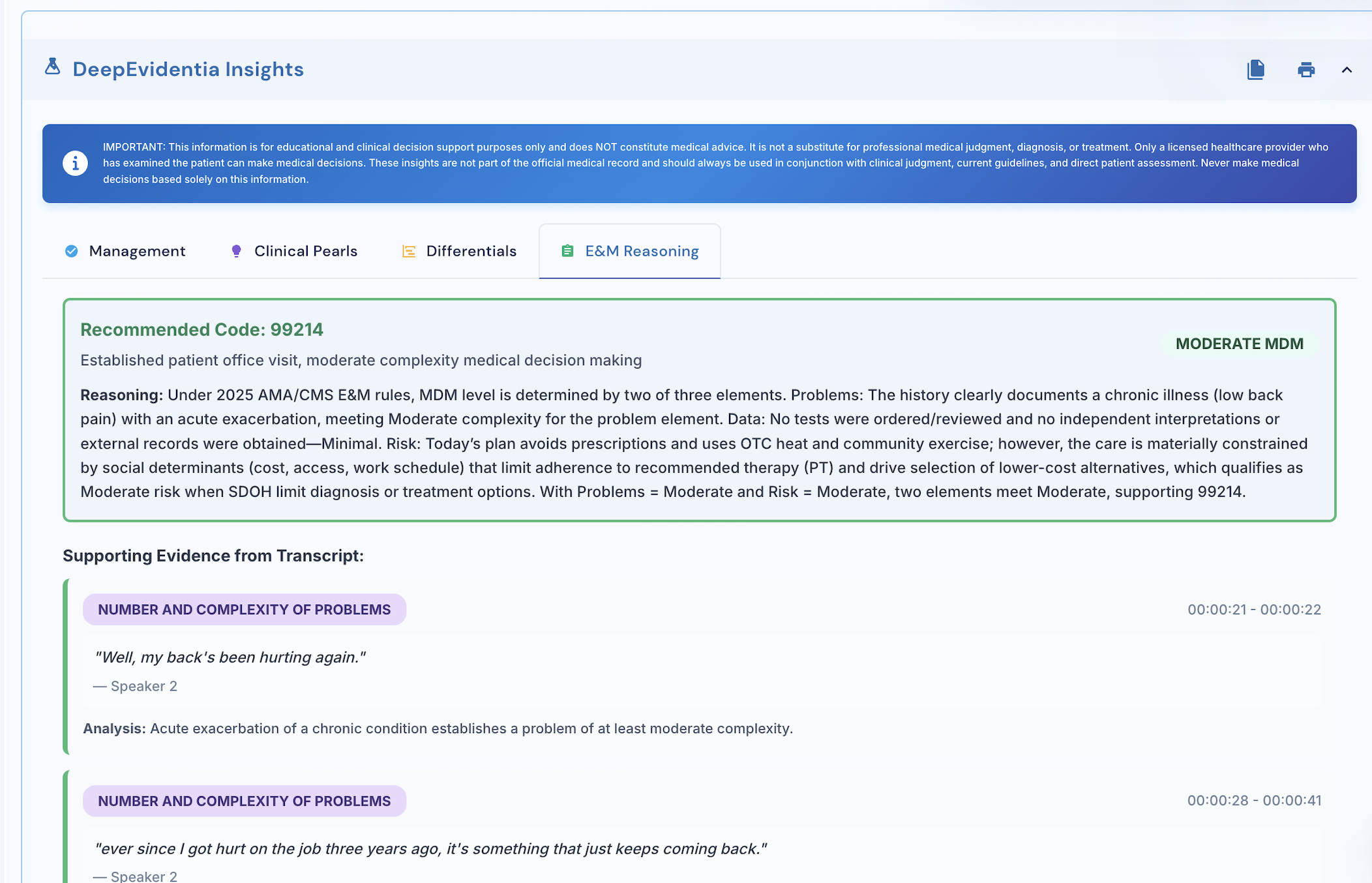
- E&M Reasoning provides automatic, audit-ready coding support:
-
- Faxing now includes a collection of meaningful workflow upgrades that make sending and receiving faxes simpler:
Favorites:
• Assign a favorite fax contact for each patient.
Batch Faxing:
• Send to multiple recipients at once with batch fax capability.
Redesigned Fax Inbox and Outbox:
Outbound Reliability:
• Improved success rates for outgoing fax delivery.
• Enhanced PDF design for professional formatting with practice logos and metadata.
• Real time delivery confirmations for Delivered, Pending, or Failed.
• One click preview for any fax PDF.
Inbound Processing:
• Smart sorting that organizes incoming faxes by sender.
• Clear tags identifying Referrals, Patient Instructions, or General faxes.
- Faxing now includes a collection of meaningful workflow upgrades that make sending and receiving faxes simpler:
-
- You can now fax the auto-generated visit summaries and referral letters directly from the Automation Hub.
The hub can be opened at any time using the new quick access icon.
You can also send secure emails from the same page, so both email and fax are handled in one place.
- You can now fax the auto-generated visit summaries and referral letters directly from the Automation Hub.
-
- All collected patient details, demographics & insurance information, now flow automatically into all your AI notes.
The same data is also auto-filled into referral letters, patient instructions, and any fax you send.
This removes the need to retype patient information, further saving you an additional 5-8 minutes per each patient.
- All collected patient details, demographics & insurance information, now flow automatically into all your AI notes.
-
-
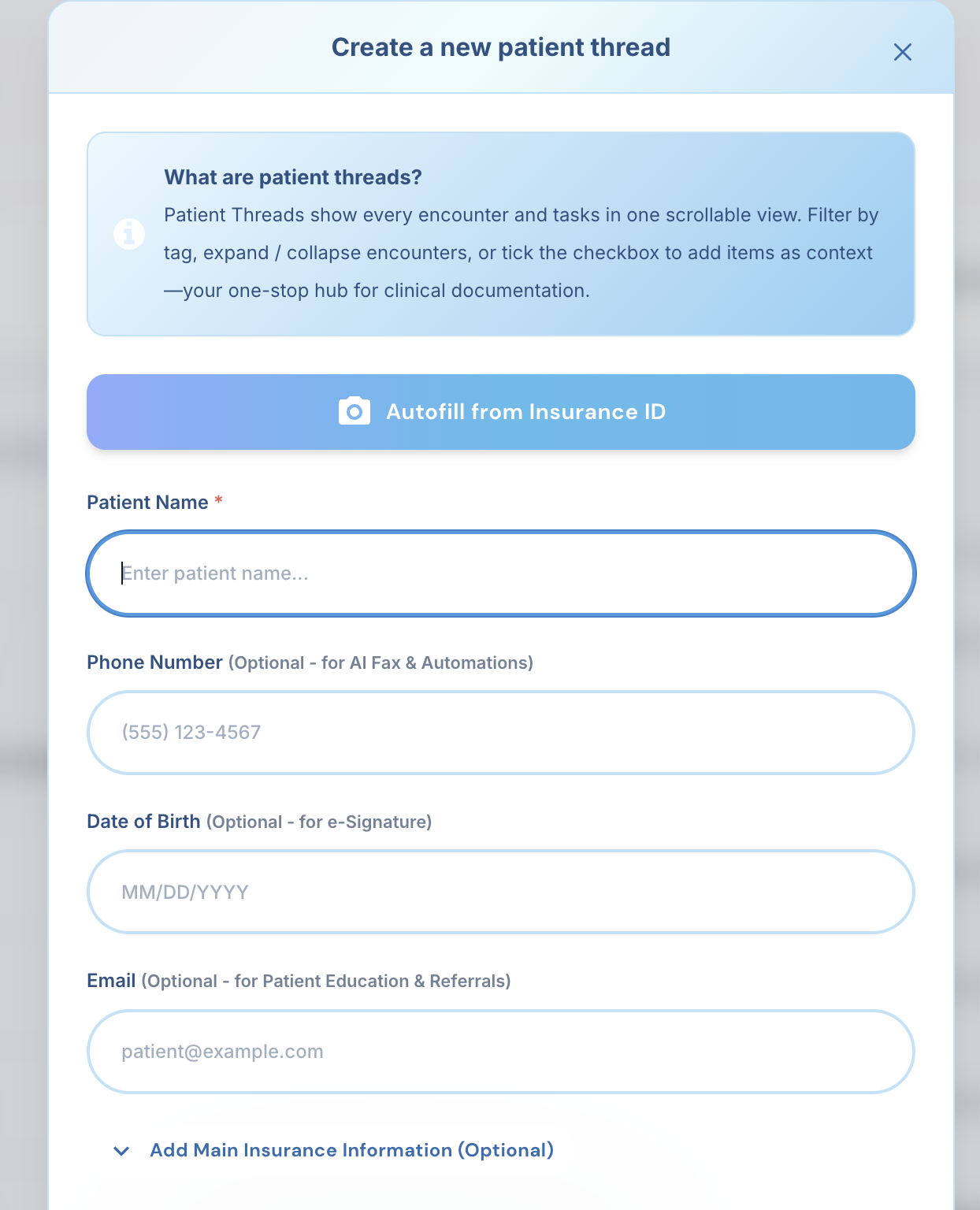
You can now scan a patient's ID or insurance card and let the system extract all key information.
Everything is captured automatically without manual data entry, saving you 5 to 10 minutes in manual entry for each patient.
-
-
- You can now duplicate any existing AI template with one click.
This helps you create variations for similar visit types without rebuilding the structure all over again.
For example, copy a detailed initial visit template and turn it into a follow up version with small edits.
- You can now duplicate any existing AI template with one click.
-
- We enhanced the way you visualize your organization by introducing a clearer hierarchical chart.
The enhancement also includes the ability to place one user in multiple departments. This supports cases like assistants who help several doctors while keeping each doctor’s notes and workspace separated.
- We enhanced the way you visualize your organization by introducing a clearer hierarchical chart.
-
- Introducing Gemini 3 Pro Model to DeepCura. You can now run your DeepCura work through Google’s newest Gemini 3 Pro, ranked by some organizations as one of the best current AI models in the world.
- Introducing Gemini 3 Pro Model to DeepCura. You can now run your DeepCura work through Google’s newest Gemini 3 Pro, ranked by some organizations as one of the best current AI models in the world.
-
- Introducing the new AI Scratchpad feature. It allows you to quickly transform selected text with simple instructions and choose whether to replace the text, append the result below it, or copy it without changing the chart.
To use it, select any part of your note and press CTRL + S. A small box will appear where you can type your request. For example, you can write “translate this,” “turn this into a table,” or “create a patient instructions section from this information.”
Press Enter and choose if you want to replace the text, add it to the note, or copy the result.
- Introducing the new AI Scratchpad feature. It allows you to quickly transform selected text with simple instructions and choose whether to replace the text, append the result below it, or copy it without changing the chart.
-
- The AI Template Teacher analyzes your written description of a template problem (e.g., missing fields, wrong order, header/newline formatting, XML tag consistency) and proposes a patch you can preview before applying.
➤ How it works:
2) Type what’s wrong and what you expect.
3) Review the suggested change in a side-by-side and test it out!
- The AI Template Teacher analyzes your written description of a template problem (e.g., missing fields, wrong order, header/newline formatting, XML tag consistency) and proposes a patch you can preview before applying.
-
- Directly send from DeepCura to the desired email the generated polished patient instructions and referral letters based on the current note.
➤ Full customizability: adjust layout, headers, and branding to match your style
➤ One-step delivery: compose, preview, and send without leaving the chart
- Directly send from DeepCura to the desired email the generated polished patient instructions and referral letters based on the current note.
-
- Keep your workspace clean and organized by selecting and archiving several patient records in one action.
- Keep your workspace clean and organized by selecting and archiving several patient records in one action.
-
-
New tools for managing your AI Tasks.
You can now delete old tasks in bulk, share active ones with your assistant, and export them in multiple formats.
➤ Share tasks: Collaborate with your assistant directly inside DeepCura.
➤ Export formats: HTML, Word, CSV, or PDF.
➤ Bulk actions: Delete completed or outdated tasks easily.
-
New tools for managing your AI Tasks.
-
- You can now enable a sound alert that plays the moment your AI note finishes generating and is ready for review.
➤ No more window-watching, meet other patients and come back when your note is ready
➤ How to enable: Settings > Automation Rules > Toggle on Notify when note is complete
- You can now enable a sound alert that plays the moment your AI note finishes generating and is ready for review.
-
- Export management tips, clinical pearls, differentials, and follow-ups with their reference links for easy sharing or documentation.
➤ Use cases: patient handouts, referral packets, team handovers
- Export management tips, clinical pearls, differentials, and follow-ups with their reference links for easy sharing or documentation.
-
-
Introducing DeepCura’s strongest integration yet — AdvancedMD .
We’re thrilled to launch a seamless connection that allows your AI Scribe to pull all patient data directly from AdvancedMD and include it intelligently in your today’s note.
➤ Complete patient history import: labs, problem lists, medications, charge slips, and more, all automatically available inside your AI note
➤ Custom templates preserved: your AdvancedMD note fields are filled exactly as you’ve designed them
➤ Charge slip automation: reduces billing errors and streamlines your revenue cycle
-
Introducing DeepCura’s strongest integration yet — AdvancedMD .
-
-
AI-generated tasks just got smarter with custom instructions.
You can now specify your own instructions to the AI tasks generated.
➤ Guide the AI to create exactly the tasks you need (labs only, appointments only, or anything else)
➤ Tag tasks by person responsible instead of just category
-
AI-generated tasks just got smarter with custom instructions.
-
-
We're introducing one of our most exciting demos of the year, another breakthrough in clinical automation.
We can now complete any PDF form exactly the way you want it with the help of AI. No more typing into tiny boxes.
➤ Tell the AI where each answer should go
➤ Add extra fields to match your workflow
➤ Save your setup so future forms are filled in automatically
-
We're introducing one of our most exciting demos of the year, another breakthrough in clinical automation.
-
-
Manage and edit tasks in bulk with your voice.
Update multiple tasks at once across any patient chart. You can:
➤ Rephrase tasks
➤ Change status (open, in progress, completed)
➤ Adjust deadlines
➤ Add or remove tasks
One voice command updates them all, saving time and keeping you organized.
-
Manage and edit tasks in bulk with your voice.
-
-
Tables and checkboxes now available in templates.
Add structured tables and interactive checkboxes to your templates. You can complete them in two ways:
➤ Voice editing: Fill out tables and checkboxes by speaking, just like completing a form out loud
➤ Auto-fill: Have forms completed automatically from your patient conversation
Perfect for orders, assessments, and structured questionnaires.
-
Tables and checkboxes now available in templates.
-
- 📚 Get differential and management insights backed by Level 1A journals.
You now receive:
➤ Differential considerations — supporting & opposing evidence tied directly to patient history and symptoms
➤ Management suggestions — treatment and lifestyle recommendations based on your encounter
All insights cite their sources. These are for support only, not part of the official medical record, and must be used with clinical judgement.
- 📚 Get differential and management insights backed by Level 1A journals.
-
-
Your edits now upgrade the AI itself.
Every change you make teaches DeepCura to rewrite its own template, evolving with your documentation style:
➤ Style lock-in: Medical terminology, phrasing, and formatting become your default
➤ Smart cleanup: Removes phrases and sections you always delete
➤ Transparent reasoning: See why each change is applied
➤ Time savings: Save 2–5 minutes per note — 3+ hours back weekly
The more you edit, the smarter your templates become.
-
Your edits now upgrade the AI itself.
-
-
Merge patient threads into one.
If you created two threads for the same patient, you can now combine them into a single, organized timeline.
-
Merge patient threads into one.
-
- 📱 The iOS app just got a major refresh.
Enjoy a cleaner, faster experience with these key improvements:
➤ Live transcript speed boost
➤ Real-time note preview
➤ View all previous notes in the patient thread
➤ Smoother interface
- 📱 The iOS app just got a major refresh.
-
- 📊 We’re bringing you the first wave of Analytics.
Your edits now do more than refine a note, they actively teach the AI and update your templates in real time. Here’s what you get in this first release:
➤ Adaptive learning: Repeated edits improve future outputs automatically.
➤ Time insights: See how long notes take to generate and how much time you’re saving with the new optimization.
➤ Edit heat map: Quickly spot which templates you adjust most often.
➤ Provider wellness tab: Tracks after-hours documentation to highlight potential burnout risk.
- 📊 We’re bringing you the first wave of Analytics.
-
- 🤖 GPT-5 has landed in your workspace.
This upgrade means your templates stick even closer to your rules. You’ll notice sharper reasoning, faster generation, and fewer surprises in output. Go ahead, put it to the test and let us know how it feels in your workflow.
- 🤖 GPT-5 has landed in your workspace.
-
-
Department-based control is here:
➤ Improved infrastructure built for larger clinics and inpatient workflows
➤ Create departments and manage user access with precision
➤ Fine-grained admin controls for assigning editing rights and visibility
➤ Live edit tracking to prevent overwriting and cross-editing conflicts
➤Share templates and notes per department: Fully, read-only, or not at all
-
Department-based control is here:
-
- 💬 HIPAA- and GDPR-compliant team messaging inside DeepCura.
➤ Discuss patients securely with your team, all within one platform
➤ Share attachments and create specific channels
➤ Bring your clinic communications into one streamlined workspace
- 💬 HIPAA- and GDPR-compliant team messaging inside DeepCura.
-
- 🧾 Set universal instructions for all your AI templates.
➤ Define your formatting, style, and terminology preferences once
➤ The instructions will automatically apply across all your templates
- 🧾 Set universal instructions for all your AI templates.
-
- 📜 View edit history and restore previous versions of your templates.
➤ Edit with clarity. Your past versions are grouped and easy to access
➤ Track how your template evolves over time
➤ Coming soon: AI learns from your manual edits to automatically enhance your template accordingly.
- 📜 View edit history and restore previous versions of your templates.
-
- 🔄 Drag-and-drop field mapping made effortless.
➤ Assign each part of your note to its correct spot in OptiMantra (Subjective, Objective, Assessment, Plan)
➤ Includes pre-built mapping examples to get you started fast
➤ Hyper-customizable, yet completely tech-stress free
- 🔄 Drag-and-drop field mapping made effortless.
-
- 🧠 Smarter PDF support for long and scanned documents.
➤ Use o3 Pro to summarize 50–100 page PDFs
➤ OCR now handles scanned faxes and image-based PDFs (up to 20 pages)
➤ Up to 100–200 pages text-only PDFs are now supported.
- 🧠 Smarter PDF support for long and scanned documents.
-
- 🛠️ Declutter your workspace by toggling off the icons you don’t use.
➤ Head to Settings > Automation Rules
➤ Choose which toolbar icons to show or hide
➤ Enjoy a cleaner, more personalized note-taking experience
- 🛠️ Declutter your workspace by toggling off the icons you don’t use.
-
- 📝 Copy while preserving formatting
Paste your notes with Markdown styling like headers, bullet points, and bolding included.
➤ Go to Settings > Automation Rules
➤ Toggle on “Copy with rich formatting.”
➤ Then go to your note and click “Copy note to clipboard”
➤ Paste it wherever you like. Right-click or use Ctrl + V / ⌘ + V
- 📝 Copy while preserving formatting
-
- 🧠 We’ve made navigating previous clinical records smoother than ever.
No more endless scrolling through old encounters, AI Clinical Context puts clarity at your fingertips.- 🗂️ Automatic tag labeling and timestamped entries now appear in a longitudinal timeline on the left-hand sidebar.
- 🔍 Search by encounter keywords or tags to find exactly what you need.
- ➕ Just tick the checkbox to “Add as context” and instantly integrate selected notes into your current encounter.
- 🧠 We’ve made navigating previous clinical records smoother than ever.
-
-
🚀 We’re releasing our most exciting feature to date: AI Patient Visualizer!
Whether you're looking to make sense of scattered patient data or quickly prepare for a follow-up session, this tool is designed to bring speed to your work.- ✨ Follow-ups became faster: Visualize the patient's full clinical history in seconds, without digging through old documentation.
- 📊 Visualize trends across encounters, vitals, labs, and more
- 📎 Download and print reports for patients or colleagues
Ready to explore your patient data like never before? Let us know what you think! Learn more about setting up AI Px Visualizer here.
-
-
- ✅ AI Task Manager just got way easier to use.
Tasks like referrals, follow-ups, and lab orders are automatically captured and logged. No templates or manual setup required!- 🧠 Recognizes phrases like “refer to derm” or “order blood tests”
- 🔄 Instant To-Do creation as part of your note work
- 🧩 Share tasks with colleagues
- ✅ AI Task Manager just got way easier to use.
-
- 🎉 O3-Pro is here! OpenAI's most powerful model just launched, and it’s now live for all DeepCura users. Starting today, O3-Pro powers both DeepEvidentia and DeepCura Scribe, delivering faster, sharper, and more context-aware responses across the board. To learn how to change your AI Model check this help desk article here.
- ⚡ Lightning-fast processing with improved reasoning accuracy
- 🧠 Better at understanding complex clinical cases and long context
- 🚀 A clear leap ahead of competitors in both speed and quality
- 🎉 O3-Pro is here! OpenAI's most powerful model just launched, and it’s now live for all DeepCura users. Starting today, O3-Pro powers both DeepEvidentia and DeepCura Scribe, delivering faster, sharper, and more context-aware responses across the board. To learn how to change your AI Model check this help desk article here.
-
- Introducing DeepEvidentia, the most ambitious AI clinical engine we’ve ever created. Ask precise clinical questions or utilize your patient cases, and receive evidence summaries sourced from top journals.
- 📚 Hand-pick the article types and specialty-specific journals you want (e.g., clinical guidelines, orthopedics)
- 💊 Now includes OpenFDA integration for top-tier drug information
- 🌍 Adds community insights alongside formal evidence
- Introducing DeepEvidentia, the most ambitious AI clinical engine we’ve ever created. Ask precise clinical questions or utilize your patient cases, and receive evidence summaries sourced from top journals.
-
-
DeepCura now supports switching transcription languages mid-encounter. Start your session in one language, pause, switch to another, and continue recording. All in one seamless conversation. Learn how in this step-by-step guide.
-
-
- You can now record both your microphone and your patient’s voice during telehealth calls — ensuring the full conversation is captured and transcribed. To learn more about telehealth in DeepCura, check this article here.
- You can now record both your microphone and your patient’s voice during telehealth calls — ensuring the full conversation is captured and transcribed. To learn more about telehealth in DeepCura, check this article here.
-
-
With Precision Voice Edit, simply speak your updates and the system will slot new data directly into your note, no typing required.
Precision SOAP Note auto-populates key details from past visits into today's visit all while retaining design style. You can review, adjust, and approve everything in one seamless workflow. To learn more about combining information from previous visits into your current one, check our help article here.
-
-
-
-
We’ve built a lightweight extension that makes scribing and importing notes into your EHR faster than ever.
Whether you use CharmHealth, eClinicalWorks (eCW), or Practice Fusion, integration is now streamlined, seamless, and cost-efficient.
The extension works in the background, helping you transcribe and auto-import without hassle. To get started, check out our dedicated Help Center guides:
-
-
-
If you often reuse the same paragraph this update is for YOU.
Quick Phrases (also known as macros) lets you save fully formatted blocks of text and reuse them instantly with just a few clicks.
For example: a pre-op checklist or a discharge summary with standard formatting. Click here to learn how to create and use quick phrases.
-
-
-
Introducing DeepCura AI Clinical Canvas — a smarter way to refine your notes.
- Highlight any section of your clinical note and press shortcut CMD + R (or CTRL + R for windows users). If needed you can also manually click the "AI Replace text" icon instead of the keyboard shortcut.
- Tell the AI what kind of edit you need.
- Instantly review a side-by-side comparison showing exactly what changed — whether it's a medication adjustment or clarifying a differential diagnosis.
This ensures you stay in full control of your documentation, especially when precision matters most.
- Highlight any section of your clinical note and press shortcut CMD + R (or CTRL + R for windows users). If needed you can also manually click the "AI Replace text" icon instead of the keyboard shortcut.
-
-
-
We're making your clinic workflow even smoother.
Whoever is triaging the patient can now use our new Pre-Chart feature. Just upload any PDFs, previous lab results, or current patient data, and you're done.
When the physician meets the patient, all they need to do is click "Add as Context" and start recording. Simple, efficient, and built to save time.
To learn more about using this feature, please click here.
-
-
-
You can now select which AI model you'd like to use: GPT-4.1, O3, O3-pro.
This gives you the option to stick with what works best for you or try out the newest capabilities.
To make a selection, simply click the mini brain icon in the upper corner.
We’re always eager to explore the latest from OpenAI, and we make sure to bring new models on board as soon as they’re released, so you’re always playing with the freshest tools out there.
-
-
-
Users can now generate AI-created clinical plots directly from patient transcripts.
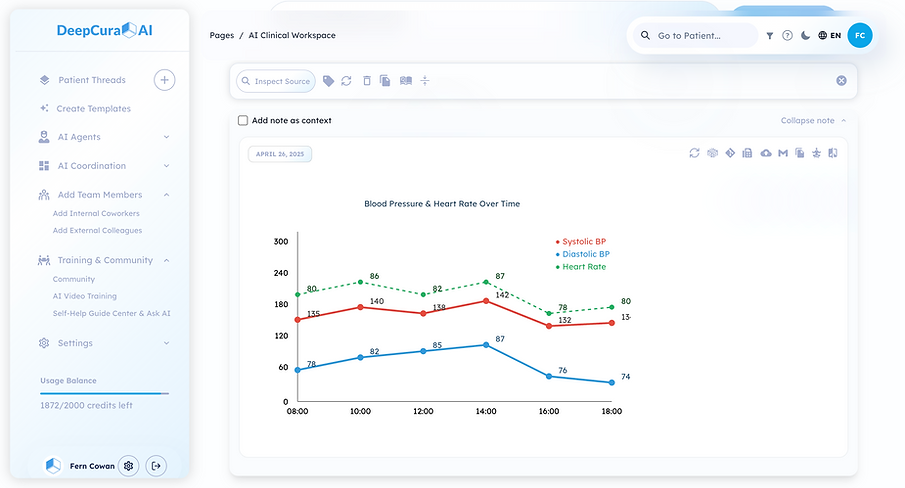
Here’s an example of the prompt we used with test (fake) patient data:
"Write SVG graphics in pure HTML and CSS to represent relevant clinical plots from this patient. Very important: write all the code without any extra spaces, new lines, or formatting.
Ignore previous instructions to generate a standard note.Use this transcript as context:
- Transcript:
Speaker 1: [00:00:14 - 00:00:16] Hi, Mr. Jones. How are you?
Speaker 2: [00:00:16 - 00:00:17] I'm good, Dr. Smith..."
This feature allows you to create a variety of clinical graphics. There may be some limitations, but we're actively improving it.
- Transcript:
-
-
- Users can now add up to 20 tags, allowing for more detailed organization of patients.
-
- We’ve updated the site font to Lexend, a typeface designed to improve reading speed and information retention based on cognitive research. Learn more about the studies behind Lexend here: https://www.lexend.com/.
We’d love your feedback — let us know how all the recent changes are improving your experience!