What You'll Learn
- Where to find and open the AI Model Selector
- The three model categories and when to use each one
- How credit costs vary by model
- How your model selection is saved and applied
Where to Find the Model Selector
The model selector is accessible from the top navigation bar inside a patient's page.
Look for the stethoscope icon — click it to open the model selection panel.
The panel displays all available AI models organized into three tabs. You can switch between tabs to browse models in each category.
The Three Model Categories
1. Standard Models
Standard models are optimized for speed and efficiency. They produce clean, well-structured clinical documentation and are the best choice for routine visits.
Use Standard models when you need:
- Fast turnaround (30–90 seconds per note)
- Clean formatting and consistent structure
- Standard clinical documentation without additional clinical analysis
Examples include GPT-5.2 Fast (30–60 seconds) and GPT-5 Reasoning (45–90 seconds). Standard models cost 1–3 credits per note, depending on the model:
| Model | Credits | Speed |
|---|---|---|
| GPT-5.2 Fast | 1 | 30–60 seconds |
| GPT-5 Reasoning | 1 | 45–90 seconds |
| Gemini 3.1 Pro | 3 | 45–90 seconds |
| Claude Opus 4.6 | 3 | 45–90 seconds |
2. CDS & E&M Models
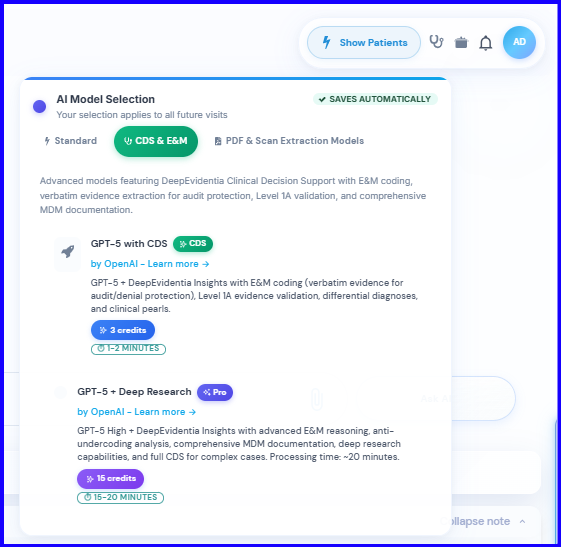
CDS (Clinical Decision Support) and E&M models go beyond documentation. In addition to generating the clinical note, they provide:
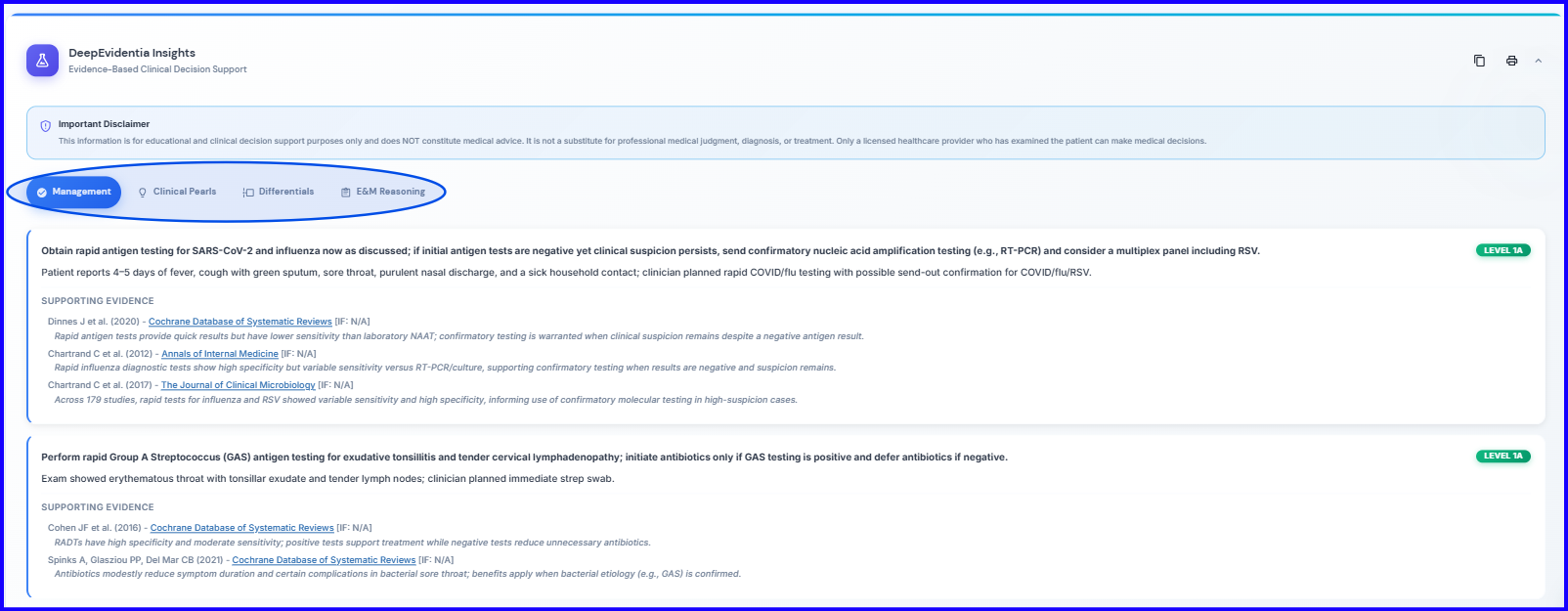
- Differential diagnosis considerations — potential diagnoses based on the recorded encounter
- Evidence references — relevant clinical evidence to support decision-making
- Management suggestions with citations — recommended next steps backed by medical literature
- E&M level coding guidance — suggested evaluation and management codes
Use CDS models when you want clinical insight layered on top of your documentation, or when you need E&M coding assistance. These models cost more credits due to the additional processing involved.
| Model | Credits |
|---|---|
| GPT-5 with CDS | 3 |
| GPT-5 + Deep Research | 15 |
3. PDF & Scan Extraction Models
PDF models are purpose-built for document processing tasks. Use them when you need to:
- Extract structured data from uploaded PDFs (lab results, referral letters, prior records)
- Process scanned documents and images
- Convert unstructured documents into organized clinical data
These models are specialized for reading and interpreting documents rather than generating notes from audio.
How Credits Work
Each model consumes a set number of credits per use. The credit cost is displayed next to each model in the selector panel.
| Category | Credit Cost | Best For |
|---|---|---|
| Standard | 1–3 credits | Routine clinical documentation |
| CDS & E&M | 3–15 credits | Clinical insight + coding assistance |
| PDF & Scan | Varies (shown in selector) | Document processing |
Your Selection Saves Automatically
When you select a model, your choice saves immediately — there is no save button to click. Your selected model applies to all future notes until you change it.
You can switch models at any time by reopening the model selector. A green checkmark indicates your currently active model.
Which Model Should You Start With?
If you are new to DeepCura, start with a Standard model like GPT-5.2 Fast. It offers the best balance of speed and quality at the lowest credit cost. Once you are comfortable with the documentation workflow, try a CDS model on a complex case to see the clinical decision support features in action.
Standard vs. CDS Models — A Visual Comparison
When you open the AI Model Selector by clicking the stethoscope icon, you will see two categories side by side:
| Standard Models | CDS Models |
|---|---|
| Focus on speed, accuracy, and clean structuring | Offer clinical insight features including differential considerations, supporting and opposing evidence, and management suggestions that cite their sources |
You can switch between these two categories at any time, depending on what you need for the current encounter.
DeepCura continuously integrates the latest AI models as they are released, so you are always working with current technology. We are always eager to explore the newest capabilities from OpenAI, Anthropic, and Google to bring you the best clinical documentation experience.
Next Steps
Continue to Lesson 0.6 — Plans, Pricing & Credits to understand how credits, subscriptions, and billing work.