What You'll Learn
- How the free trial works
- How credits are consumed across different features
- Monthly and annual plan pricing with volume discounts
- Enterprise pricing for larger organizations
- The difference between billing seats and free team members
- Payment, cancellation, and subscription management
Free Trial
Every new account starts with a free trial that includes 30 credits. Key details:
- No credit card required — sign up at app.deepcura.com/register and start using DeepCura immediately.
- No time limit — your trial does not expire. Use your 30 credits at your own pace.
- No auto-billing — you will never be charged automatically. You choose when to subscribe.
- Full access — trial credits work across all features: AI Scribe, AI Receptionist, AI Outbound Calls, AI Chat, Fax Management, and EHR Integration.
- All AI models included — every model tier is available during the trial.
- Free training session — schedule a live onboarding session with our team at any time.
- HIPAA and PIPEDA compliant — your data is protected from day one.
How Credits Work
Credits are the universal currency across DeepCura. Every AI-powered action consumes credits from your account balance.
- Credits are shared across all agents and features — there are no separate balances per feature.
- Credits reset monthly with your subscription renewal date.
- Credits are tied to each individual account and cannot be shared or pooled between team members.
- Your current credit balance is always visible in the left sidebar so you can track usage at a glance.
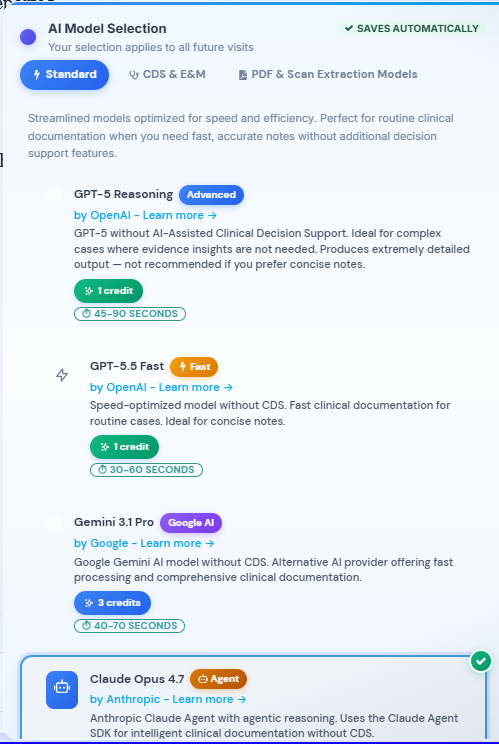
AI Scribe (Clinical Note Generation)
| Model Tier | Models | Credits |
|---|---|---|
| Standard | GPT-5.2, GPT-5.5 Fast | 1 |
| Standard + | Gemini 3.1 Pro, Claude Opus 4.7 | 3 |
| Advanced (CDS) | GPT-5 with CDS, GPT 5 + Dee | 3 |
| Premium | GPT-5 + DeepResearch | 15 |
PDF & Document Processing
| Action | Credits |
|---|---|
| PDF analysis — Gemini 3.1 Pro or Claude Sonnet 4.6 | 3 |
| PDF analysis — Claude Opus 4.6 | 10 |
| Document summarization | 1 |
Voice & Calling
| Action | Credits |
|---|---|
| AI Receptionist — inbound call answered | 1 |
| AI Receptionist — outbound call placed | 1 |
| AI Schedule Agent — call or task completed | 1 |
| Web voice agent session | 1 |
Transcription
| Action | Credits |
|---|---|
| Audio recording (per recording segment) | 0.1 |
Messaging & Fax
| Action | Credits |
|---|---|
| SMS sent to patient | 1 |
| Fax received and processed | 1 |
| Email processed (with attachments) | 1 |
EHR Sync
| Action | Credits |
|---|---|
| Patient sync (any EHR) | 1 |
| Push note to EHR | 1 |
Agents
| Action | Credits |
|---|---|
| AI Patient Visualizer | 3 |
| AI Nurse | 1 |
| DeepEvidentia | 2 |
| AI Forms | 3 |
| Automation Hub (patient letter, referral, prior Auth) | 1 |
Marketing & Other
| Action | Credits |
|---|---|
| Marketing page generation | 10 |
| Marketing page iteration | 5 |
| Marketing image generation | 3 |
| Professional bio generation | 1 |
Monthly Plan
The monthly subscription starts at $129 per seat per month and includes 1,000 credits per seat.
Need more credits? Add 1,000 extra credits for $59/month per seat (requires an active subscription).
Volume discounts apply automatically when you add multiple billing seats:
| Seats | Discount | Price per Seat |
|---|---|---|
| 1–2 | — | $129/mo |
| 3–5 | 10% off | $116/mo |
| 6–10 | 15% off | $110/mo |
| 11+ | 22% off | $101/mo |
Discounts are graduated — for example, a 5-seat monthly plan costs: 2 seats x $129 + 3 seats x $116 = $606/mo (avg $121/seat).
Volume discounts apply to monthly plans only. A 22% discount is also available for residents, groups, and EHR partners.
Annual Plan
The annual subscription is a flat $999 per seat per year — a 35% savings compared to the monthly rate. Annual plans include 1,000 credits per seat at a flat rate regardless of seat count.
You can toggle between monthly and annual pricing in the billing settings to compare costs before committing.
Enterprise — Custom Pricing
For organizations with 10 or more providers, DeepCura offers enterprise pricing that includes:
- Up to 22% automatic monthly discount at 11+ seats
- Dedicated onboarding and training for your entire team
- Priority support
Book a demo or training session: Schedule here
Billing Seats vs. Free Team Members
Only providers who use AI features need a paid billing seat. You can invite your entire team at no extra cost.
- Billing seats are for providers who use AI-powered features (AI Scribe, AI Receptionist, AI Chat, etc.). Each seat gets 1,000 credits and costs $129/mo (or $999/yr).
-
Free team members are for staff who need access to the platform but do not use AI features — such as front desk staff, medical assistants, office managers, or billing coordinators. Free team members can:
- View and edit clinical notes
- View transcripts and patient records
- Manage schedules and tasks
- Collaborate via team messaging and channels
This means a 5-provider practice with 10 support staff only pays for 5 billing seats, not 15.
You manage billing seats from Settings → Billing or from the Billing Seats tab on the Team Members page.
Payment and Cancellation
- Accepts all major credit and debit cards via Stripe
- Cancel anytime — no penalties, access continues through your billing period
- Manage your subscription, payment method, and invoices from Settings → Billing
Where to Manage Your Subscription
All billing management is in one place:
- Open the left sidebar and click Settings.
- Select the Billing tab.
- From here you can:
- View your current plan and credit balance
- Switch between monthly and annual billing
- Add or remove billing seats
- View invoice history
- Update your payment method
Next Steps
You have completed Module 0: Welcome & Setup. You now understand how to navigate DeepCura, use the AI Consultant, choose an AI model, and manage your subscription. Continue to Lesson 1.1 — The AI Scribe Workspace to begin Module 1 and record your first patient encounter.