📍 Navigate to: Sidebar → Settings → Profile Settings → Integrations tab → EHR → eClinicalWorks · Full UI Guide
💰 Pricing
DeepCura for eClinicalWorks costs $129/month total. This includes the $50/month integration fee charged by eClinicalWorks for FHIR API access — you pay one price and get everything.
| What You Get | Cost |
|---|---|
| DeepCura + eCW integration (includes $50 eCW FHIR fee) | $129/month total |
The plan includes 1,000 credits (6 AI agents, full FHIR R4 write-back), which supports approximately 15–20 patient encounters per day.
🔑 Step 1: Connect DeepCura to eCW
Follow the steps in the attached video to link both systems together.
eClinicalWorks (eCW) Integration Setup Guide
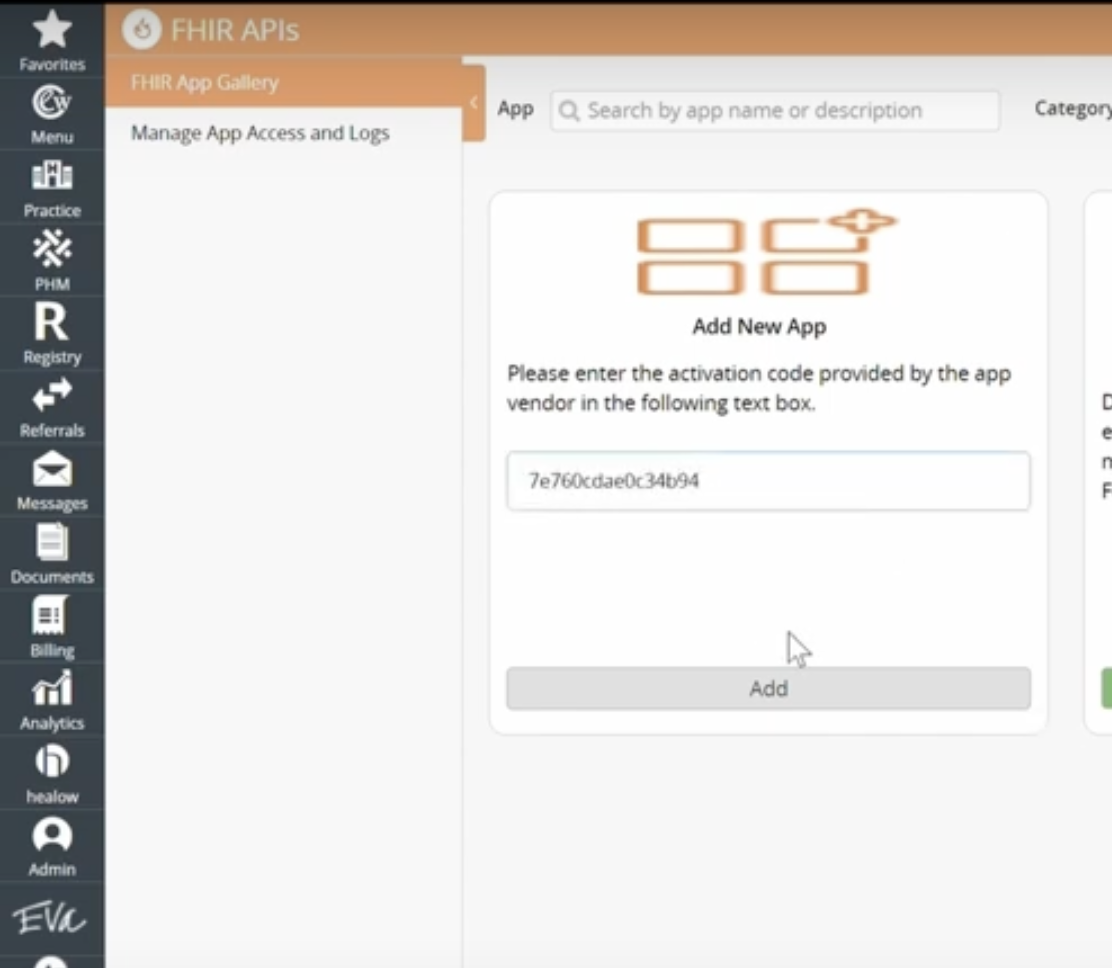
Step 1 — Add DeepCura as an Authorized App in eCW
- Go to eCW Admin → Product Activation → FHIR APIs → Provider Centric Apps
- Click Add New App
- Enter activation code:
7e760cdae0c34b94 - Scroll down → click Continue → scroll down → click Approve
- The request will show as Pending — contact DeepCura support to approve it on our end
Step 2 — Activate the Integration in eCW
Once DeepCura approves the request:
- Return to eCW Admin → Product Activation → FHIR APIs → Provider Centric Apps
- Click Activate under DeepCura
- Select all checkboxes → click Next
- Click App Configuration → select all providers you want included
⚠️ #1 Setup Mistake: Skipping "App Configuration" for Each Provider
After activating DeepCura in Product Activation, you must also go to App Configuration and explicitly enable each provider who will use the integration. This is a separate step that many admins miss.
If you skip this step, the provider will see a "FHIR App not enabled for this user" error when they try to connect their eClinicalWorks account to DeepCura. The integration will not work — no schedule sync, no prechart summaries, no write-back, nothing.
How to fix it: Go back to Admin → Product Activation → FHIR APIs → Settings, then click App Configuration (not just Activate). Select each provider by name and grant them access to the DeepCura app.
This is a per-provider setting — if your practice has 5 providers, all 5 must be individually enabled in App Configuration. Activating the product at the practice level is not enough.
Step 3 — Connect eCW in DeepCura
- Go to DeepCura → Settings → Profile Settings → Integrations → EHR
- Select eCW
- Enter your Practice ID → click Save Integration Settings
- eCW will automatically prompt you again → click Continue and Approve
Can't find your Practice ID?
Method 1 — Contact eCW Support (Fastest)
Ask your eCW representative: "Can you provide our practice's 6-digit OEM/Practice Code for third-party integrations?" They can retrieve it immediately.
Method 2 — Check Support Tickets
If you've ever opened integration tickets, search for terms like "OEM Code," "Practice Code," or "Interface Code" in the ticket notes.
Method 3 — Contact Us
Once you start setting up your integration, contact us via the chat, and we will provide your practice code directly.
🟩 Step 2: All Integration Features
What Works Instantly (Day 1)
As soon as you connect your eClinicalWorks account to DeepCura, these features are ready to use — no waiting, no meetings, no approval queues:
| Feature | Status |
|---|---|
| 📅 Automated calendar sync | ✅ Available immediately |
| 📋 Pull patient summaries & chart data | ✅ Available immediately |
| 🩺 Push problems & diagnoses (ICD-10 + SNOMED) | ✅ Available immediately |
| ⚠️ Push allergies (SNOMED CT + criticality) | ✅ Available immediately |
| 💊 Push medications (RxNorm prescriptions + reconciliation) | ✅ Available immediately |
| 🧪 Push lab & imaging orders (LOINC-coded) | ✅ Available immediately |
| 💉 Push immunizations (CVX codes + site/route/lot) | ✅ Available immediately |
| 📝 Push clinical notes (HL7 ORU^R01) | Through Scribe eCW |
That is 5 out of 6 AI agents fully operational on day one. The AI Scribe agent still generates your 14-section clinical note instantly — you just review and confirm it within DeepCura until note push-back is enabled.
Calendar sync
Pull patient summary and chart data from eCW to DeepCura
Push problems, allergies, medications, labs, and immunizations
What Writes Back to eCW vs. What Doesn't
DeepCura creates clinical data in eCW via FHIR R4 — all operations are one-way writes (create only, no updates or deletes). Here's a clear breakdown:
Writes Back Automatically (Day 1)
| Data Type | FHIR Resource | Code System |
|---|---|---|
| Problems & diagnoses | Condition | ICD-10-CM + SNOMED severity |
| Allergies | AllergyIntolerance | SNOMED CT |
| Medication orders | MedicationRequest | RxNorm |
| Medication reconciliation | MedicationStatement | RxNorm |
| Immunizations | Immunization | CVX |
| Lab & imaging orders | ServiceRequest | LOINC |
Not Supported
| Data Type | Why |
|---|---|
| Patient demographics (address, phone, email, gender) | Patient data is read-only — DeepCura reads patient names and DOBs from eCW but does not write demographic updates back |
| Insurance / coverage information | No Coverage FHIR resource writes are implemented |
| Patient account balances | DeepCura does not read or write billing/balance data from eCW |
| Updating existing records | All writes are create-only — DeepCura cannot modify or delete previously written conditions, allergies, medications, etc. |
What DeepCura Reads from eCW (Not Written Back)
- Encounters/Appointments — provider's scheduled appointments for calendar sync
- Patient demographics — name and DOB for resolving patient identity in HL7 messages
- Existing conditions — fetched to de-duplicate before writing new diagnoses
- Practitioner info — provider NPI and name for note attribution
🟨 Step 3: Send your newly generated note to eCW
Pushing Notes to eCW
Manual Paste via Scribe-It
- Import the eCW-specific template into your account: eCW Scribe-It Template
- Generate your note in DeepCura
- Paste it into the Scribe-It page in eCW as shown in the video below:
For a complete overview of what's possible, read our guide on using an AI scribe for eClinicalWorks with FHIR R4 integration.
Related to